Lightning-Fast Check-In
Scan QR codes in under 1 second. Move attendees through entry gates 10x faster than paper tickets or physical scanning. No more bottlenecks at doors.
Create digital event tickets for Apple Wallet that deliver fast check-in, eliminate fraud, and keep attendees informed with real-time updates. No more paper tickets, no printing costs, no check-in delays. Perfect for concerts, conferences, festivals, and sports events.
✓ Free forever plan • ✓ No credit card required • ✓ Launch your event in minutes
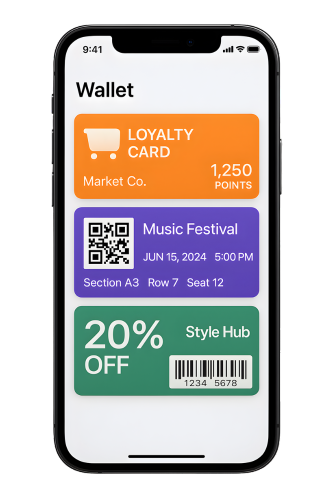
Say goodbye to printing costs, long entry lines, and ticket fraud. Digital event tickets make check-in seamless.
Scan QR codes in under 1 second. Move attendees through entry gates 10x faster than paper tickets or physical scanning. No more bottlenecks at doors.
Each ticket has a unique, encrypted QR code. Screenshots don't work, duplicates are instantly detected, and once scanned, tickets can't be reused. Reduce fraud by 99%.
Tickets arrive in seconds via email or SMS. Attendees add them to Apple Wallet with one tap. No shipping delays, no lost tickets, no reprinting.
Gate changes? Schedule updates? Weather delays? Push notifications directly to all tickets. Attendees see updates on their lock screen immediately.
Save thousands on printing, paper, and shipping. Digital tickets cost pennies per attendee. Better for the environment and your budget.
See real-time check-in rates, track VIP arrivals, monitor gate traffic, and spot no-shows instantly. Make informed decisions during your event.
Create professional mobile event tickets in minutes, no technical expertise needed.
Add your event name, date, venue, logo, and branding. Set ticket tiers (General, VIP, Backstage), assign seats or sections, and customize fields.
Send tickets via email or SMS after purchase. Attendees tap to add tickets to Apple Wallet. Each ticket gets a unique QR code for entry.
Staff scan QR codes with any smartphone or tablet. Instant validation prevents duplicates. Track check-ins and attendance in real-time from your dashboard.
From intimate workshops to massive festivals, digital tickets scale to any event size.
Multi-day passes, VIP wristband replacement, gate change notifications, artist meet-and-greet tickets. Handle thousands of attendees with ease.
Multi-session passes, workshop check-ins, networking badges, sponsor access levels. Update session schedules and room changes in real-time.
Season tickets, single-game tickets, seat assignments, VIP box access. Send pre-game notifications, parking info, and gate opening times.
Reserved seating tickets, matinee vs evening shows, season subscriptions. Notify attendees of last-minute cast changes or showtimes.
Free community events, food festivals, art fairs, cultural celebrations. Track attendance, manage capacity, send weather alerts.
Educational events, training sessions, certification courses. Track attendance for certificates, send pre-event materials and reminders.
Everything you need to manage events from 50 to 50,000 attendees.
Staff scan tickets with any smartphone or tablet. Works offline for reliability. Validates in under 1 second and prevents duplicate entries automatically.
Assign specific seats, rows, sections, or general admission zones. Each ticket displays the attendee's location clearly on their phone.
Automatic reminders 24 hours before the event. Send last-minute updates for gate changes, parking info, or schedule adjustments.
General admission, VIP, early bird, group tickets, student discounts, sponsor passes. Create unlimited ticket types with different pricing and perks.
Allow attendees to transfer tickets to friends or resell through approved channels. New owners get fresh tickets, old tickets become invalid.
Tickets appear on attendees' lock screens when they arrive at the venue. Show parking directions, entrance gates, and facility maps.
Track check-in rates by the minute. See which gates are busiest, monitor VIP arrivals, identify no-shows, and export attendance reports.
Connect with Eventbrite, Stripe, PayPal, Mailchimp, and more. Use our API to build custom ticketing flows into your website or app.
Add your event logo, brand colors, sponsor logos, and custom imagery. Make tickets look professional and match your event branding.
Real success stories from events powered by WalletForge digital ticketing.
We moved 3,000 people through gates in 45 minutes. Fastest check-in we've ever had. The QR scanning is instant, and the fraud prevention caught 17 duplicate attempts that would've been disasters with paper tickets.
When our conference venue changed rooms last minute, we pushed updates to 800 tickets instantly. Attendees got notifications on their phones immediately. Crisis averted! This saved our event.
We saved $4,200 on printing costs for our first event. Plus, the analytics showed us which marketing channels drove the most attendees. ROI was immediate and measurable.
Start free for small events, upgrade as you grow. No per-ticket fees on paid plans.

Everything you need to know about digital event ticketing with Apple Wallet.
Digital event tickets are mobile tickets that attendees store in their Apple Wallet. Each ticket has a unique QR code or barcode for fast, contactless check-in. No paper printing needed - attendees receive tickets via email or SMS and add them to their phone with one tap.
After purchase, attendees receive a link via email or SMS. They tap the link, and the ticket adds instantly to their Apple Wallet. The ticket appears on their lock screen as the event approaches, making it easy to find.
Yes! If your event time changes, venue changes, or gate assignments update, you can push real-time updates to all tickets. Attendees see notifications on their lock screen immediately - perfect for schedule changes or important announcements.
Attendees open their Apple Wallet and present their ticket. Your staff scans the QR code with any smartphone or tablet using our scanning app. The system validates the ticket in under 1 second, marking it as checked in to prevent duplicate entries.
All types: concerts, music festivals, conferences, trade shows, sports events, theater performances, comedy shows, workshops, seminars, galas, fundraisers, and any ticketed event. From 50 to 50,000 attendees.
Each ticket has a unique, encrypted QR code that's validated against our secure database. Once scanned and checked in, the ticket cannot be used again. This prevents screenshots, photo copies, and duplicate entries - reducing fraud by 99%.
Absolutely! Add seat numbers, row assignments, section names, VIP status, or any custom fields to tickets. Each attendee sees their specific seat assignment on their ticket in Apple Wallet.
You can enable ticket transfers through your dashboard. The original recipient can transfer their ticket to another person via email. The new recipient receives a fresh ticket in their Apple Wallet, and the original becomes invalid.
Join 1,200+ event organizers using digital tickets for faster check-in, zero fraud, and happier attendees. Start free today.